
Remote Interpretation Is Harder Than It Looks — And Here Is What You Can Do About It
What event organizers, NGO managers, and communication professionals need to know before their next virtual multilingual event.

Remote interpretation has become the norm. Since 2020, organizations that once relied exclusively on in-person conference interpreters have embraced virtual platforms as a practical, cost-effective, and often necessary alternative. The technology has improved significantly. The platforms have matured. And professional interpreters have adapted.
But there is a gap that rarely gets discussed openly — and it sits squarely between what clients expect and what the technology actually delivers.
Remote simultaneous interpretation is significantly more demanding than its in-person equivalent. Not because the interpreters are less skilled. But because the environment in which they are working introduces a layer of technical and cognitive challenges that simply does not exist in a physical booth. When those challenges are not understood — or not prepared for — the quality of interpretation suffers. And when interpretation quality suffers, so does your event.
This post explains what those challenges are, why they matter, and — most importantly — what you as an organizer or client can do to make your next remote multilingual event run as smoothly as possible.
⚠️The Hidden Demands of Remote Interpretation
1. 🎙️Poor Audio Quality Is Not a Minor Inconvenience — It Is a Performance Problem
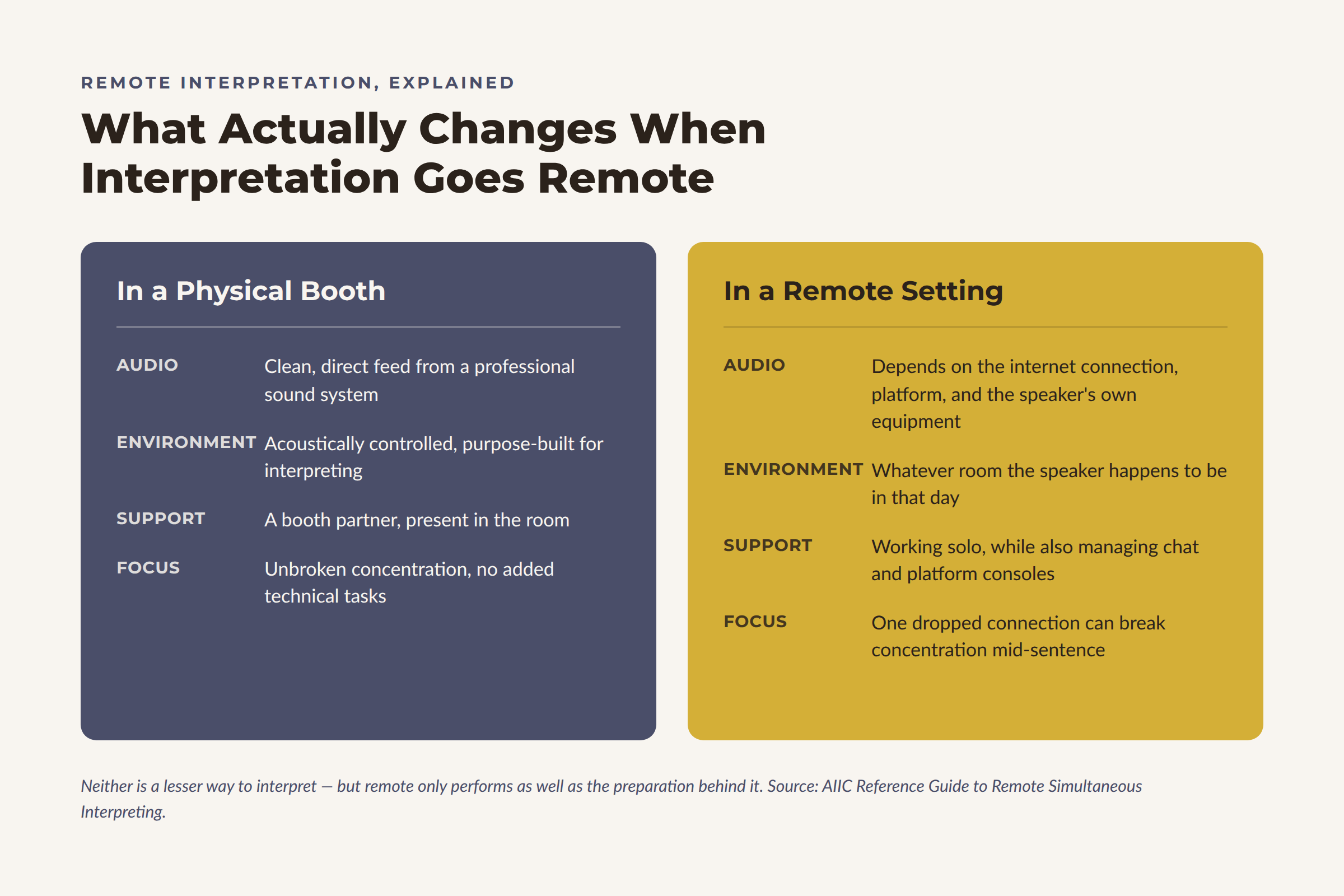
In a physical booth, an interpreter receives a clean, direct audio feed from a professional sound system. The acoustic environment is controlled. The signal is clear.
In a remote setting, that same interpreter is working with whatever audio their internet connection, platform, and the speaker's equipment can deliver. And the difference is significant.
When audio quality drops, interpreters have to ask for repetition more often, sometimes mishear without catching it — meaning the misinterpretation flows through to the audience undetected — and lose precision on exactly the kinds of details that matter most: numbers, names, technical terms, and specialized vocabulary.
This is not an experience problem. It is an accuracy problem. And it begins long before the interpreter opens their mouth.
I have seen this happen firsthand. During one multilingual webinar, participants were each joining from their own device rather than a shared room. One of them was logging in from her car, parked beside a highway with the window open. She had no headphones, her connection was unstable, and the road noise made it nearly impossible to hear her clearly. Despite everyone's best efforts, her message did not come through — not because the interpretation failed, but because the audio never gave us enough to work with.
2. ⚠️Internet Instability Breaks Concentration at the Worst Possible Moment
Simultaneous interpretation requires unbroken concentration. The interpreter is listening, processing, and speaking simultaneously — with no margin for disruption. A dropped connection, a frozen screen, or a sudden drop in audio quality does not just cause a technical inconvenience. It breaks a cognitive chain that is extremely difficult to reconnect mid-sentence.
The AIIC Reference Guide to Remote Simultaneous Interpreting identifies several specific stressors unique to the remote environment, including potential fatigue from extensive technical testing before each session, additional cognitive load from managing non-interpreting tasks such as chat functions, and the stress of working without a physically present booth partner.
These are not complaints. They are documented professional realities that directly affect output quality.
3. ⚠️Remote Interpretation Increases Cognitive Fatigue — Faster
Research consistently shows that remote simultaneous interpretation is more cognitively demanding than in-person work. Studies show that remote simultaneous interpreting causes more fatigue than in-person interpreting, with interpreters managing multiple screens, chat communication, software consoles, and document feeds simultaneously — all on top of the core cognitive task of interpreting itself.
Research published in Frontiers in Psychology confirms that turn durations in simultaneous interpretation should be limited to 20 to 30 minutes to avoid fatigue-related decreases in quality — a standard that applies even more strictly in remote settings, where the cognitive load is higher from the outset.
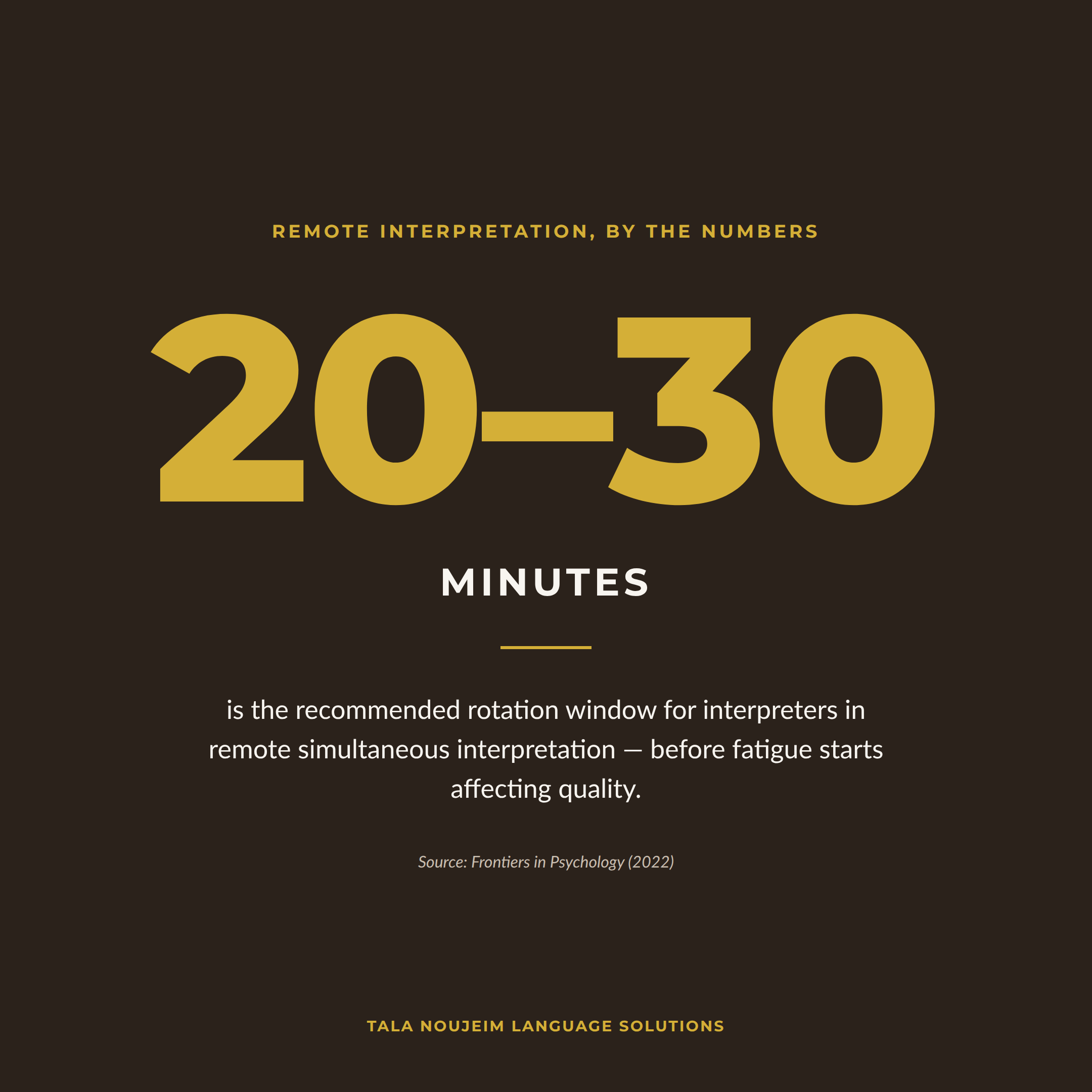
What this means in practice: if you are running a remote multilingual event and your interpreters are not rotating regularly, the quality of interpretation in hour two will not match the quality in hour one. That is not a staffing failure. It is a physiological one.
4. ⚠️Speakers and Organizers Are Often the Weakest Link
This is the part that is hardest to say but most important to hear. In the majority of remote interpretation incidents that affect quality, the root cause is not the interpreter and not the platform. It is the speaker's setup or the organizer's preparation.
A speaker presenting from a noisy environment with a built-in laptop microphone, on a Wi-Fi connection, without headphones, reading from a script at twice the normal speaking pace — is making the interpreter's job exponentially harder. And in many cases, that speaker has no idea.
“Most remote interpretation problems trace back to a speaker’s setup - not the interpreter or the platform.”
📋What You Can Do: A Practical Guide for Organizers and Clients
The good news is that most of the technical and logistical challenges of remote interpretation are preventable. They require preparation, not expertise. Here is what the professionals recommend.
📋For Speakers — Share This With Everyone Presenting at Your Event
These recommendations are drawn directly from AIIC — the International Association of Conference Interpreters — the global professional body that sets the standards for conference interpretation worldwide.
Use a wired internet connection. Connect your computer to your router via an Ethernet cable. Wi-Fi and mobile hotspots are not suitable for online events with interpretation. A dropped connection mid-speech is not recoverable in real time.
Use an external, plugged-in microphone. The built-in microphone on a laptop or mobile phone does not deliver the audio quality that interpretation requires. Interpreters need high-quality, clear audio input to work accurately. A dedicated external microphone makes a measurable difference.
Wear headphones. Headphones prevent audio feedback and echo, which are among the most disruptive technical issues for interpreters. They also help the speaker hear questions and responses more clearly, improving the overall flow of the session.
Raise your camera or screen to eye level. Interpreters rely on lip reading and body language to support their understanding of what is being said — particularly when audio quality is imperfect. A camera angled up from a desk provides almost none of that visual information.
Control your environment. Choose a quiet room. Close the door. Disable push notifications on your phone, laptop, and any other device. Background noise — a ringing phone, a passing car, a nearby conversation — competes directly with your voice in the interpreter's earpiece.
Adjust your lighting. Ensure the room is well lit, preferably with natural light. Sit facing your light source. A backlit or poorly lit speaker is difficult to see, which reduces the visual cues that interpreters depend on.
Speak at a natural pace. Reading from a script at full reading speed is one of the most common and most damaging things a speaker can do to interpretation quality. Simultaneous interpretation requires the interpreter to stay just a few seconds behind the speaker. At an unnatural pace, that gap becomes impossible to manage without loss of accuracy.
Always state which language you will be speaking in at the start. This allows participants to select the correct interpretation channel before you begin, and gives interpreters the split-second preparation they need to be ready.
🤝For Organizers — Before the Event
Confirm how many interpreters you actually need. A single interpreter can work bidirectionally — from English into Arabic and from Arabic into English, for example — within the same booth. I have worked events where a client booked twice as many interpreters as necessary, believing each language pair required a separate interpreter for each direction. Confirming this with your language partner in advance can save a meaningful part of your budget.
Familiarize yourself with your platform's interpretation feature before the day. Platforms such as Zoom, Kudo, Ablio, Verspeak, and Interactio each have their own interpretation workflow. Zoom, for example, has a built-in interpretation feature that must be enabled by the host before the meeting begins, with each interpreter assigned to a specific language channel. If this is not set up correctly in advance, interpretation cannot be activated once the event is live. Do not discover this during your opening remarks.
In my experience, this is still one of the most common obstacles, even years after remote events became routine. Organizers are often not fully familiar with their platform's interpretation settings — how to enable the feature, where to find the language-channel toggle, or how to assign two interpreters to the same booth using their email addresses. When this has not been worked out in advance, the meeting starts late while the issue gets resolved live, in front of the audience it was meant to serve.
Kudo is a dedicated remote simultaneous interpretation platform designed specifically for multilingual events, with features such as a virtual interpreter console, language channel selection for participants, and document sharing with interpreters built in.
Ablio offers remote interpretation with a focus on simplicity and accessibility, allowing participants to join language channels directly from a browser without downloading additional software.
Verspeak provides a professional remote interpretation environment with dedicated interpreter booths and integrated event management tools.
Interactio is a remote simultaneous interpretation platform built for large-scale conferences and events, offering dedicated interpreter consoles, multi-channel audio for hybrid and in-person settings, and an attendee app that allows participants to select their preferred language directly from their phone.
Each platform works differently. If you are using one for the first time, schedule a test session — not just a technical check, but a full rehearsal with your interpreters present.
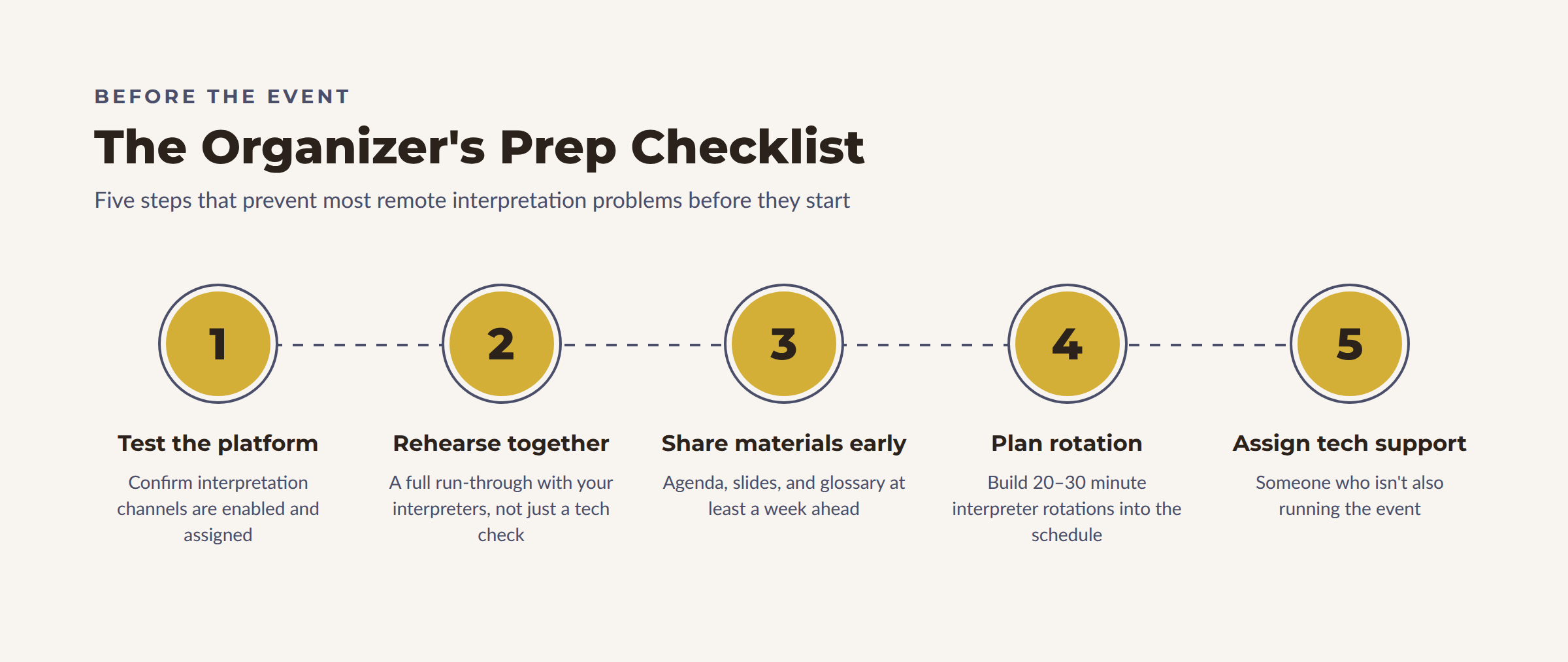
Schedule a rehearsal with your interpreters before the event. This is not optional — it is essential. A rehearsal allows interpreters to test their audio and connection, familiarize themselves with the platform interface, identify any technical issues before they become live problems, and — critically — get a sense of each speaker's pace, accent, and style. The AIIC recommendations are explicit on this point: a rehearsal is both a technical and a professional necessity.
Share all materials with your interpreters in advance. Send the full agenda, speaker presentations, background documents, and any relevant terminology or glossary at least one week before the event. Remote interpreters cannot lean over to a colleague to clarify a term they missed. Preparation is their only safety net.
Plan for interpreter rotation. In a remote simultaneous interpretation setup, interpreters should rotate every 20 to 30 minutes. If your event runs for three hours, plan accordingly. Build rotation into your schedule and ensure your platform supports the handover process smoothly.
Keep only the active speaker's microphone open. Overlapping voices and background noise from multiple open microphones are among the most disruptive challenges for remote interpreters. Assign a host or moderator to manage microphone access throughout the event.
Have a technical contact available throughout the event. If something goes wrong — a platform crash, a connection failure, an interpreter who cannot be heard — you need someone who can act immediately. That person should not be the same person running the event.
💬A Note on Platform Literacy
One of the most consistent gaps we observe is that organizers invest considerable time and budget in choosing an interpretation platform — and then leave their speakers and participants to figure it out on the day.
Platform literacy matters. Participants who do not know how to switch to an interpretation channel will listen to the original audio and miss the interpretation entirely. Speakers who do not know to state their language at the start of their remarks create confusion for both interpreters and participants. A thirty-second tutorial sent to all participants before the event — explaining how to access interpretation channels on whichever platform you are using — can prevent a significant proportion of the issues that disrupt remote multilingual events.
❓ Frequently Asked Questions About Remote Interpretation
What is remote simultaneous interpretation, and how is it different from in-person interpreting?
Remote simultaneous interpretation is the same real-time, speech-to-speech interpreting delivered in a traditional conference booth, except the interpreter works from a remote hub or home studio and receives audio and video through an online platform instead of a direct sound feed. The core skill is identical, but the working conditions are not: internet stability, audio quality, and platform behavior all become variables the interpreter cannot control, which is why remote interpretation carries a higher risk of technical disruption than in-person interpreting.
How much does poor audio quality actually affect interpretation accuracy?
Significantly. Interpreters rely on hearing every word clearly the first time, since there is no opportunity to rewind a live speaker. When audio quality drops, interpreters are more likely to miss or mishear specific details such as numbers, names, and technical terminology — errors that can pass through to the audience without anyone noticing. This is why remote interpretation places so much weight on a speaker's microphone, connection, and environment.
How often should interpreters rotate during a remote event?
Professional guidance, including research published in Frontiers in Psychology, recommends limiting turns to 20 to 30 minutes to prevent fatigue-related quality loss. This standard applies to in-person interpreting as well, but the added cognitive load of remote interpretation — managing screens, chat functions, and platform consoles alongside the interpreting itself — makes consistent rotation even more important in a remote setting.
What is the single most important thing an organizer can do to improve remote interpretation quality?
Schedule a rehearsal with your interpreters before the event, and make sure every speaker uses a wired connection, an external microphone, and headphones. Most remote interpretation problems trace back to a speaker's setup or a lack of preparation rather than to the interpreter or the platform, so addressing these basics prevents the majority of issues before the event even begins.
🔑The Bottom Line
Remote interpretation is a genuinely impressive professional achievement. A skilled interpreter, working from a home studio or a remote hub, can deliver the same standard of accuracy and fluency as a colleague in a physical booth — provided the conditions allow it.
Those conditions are not complicated. They do not require expensive equipment or technical expertise. They require preparation, communication, and a basic understanding of what your interpreter needs to do their best work.
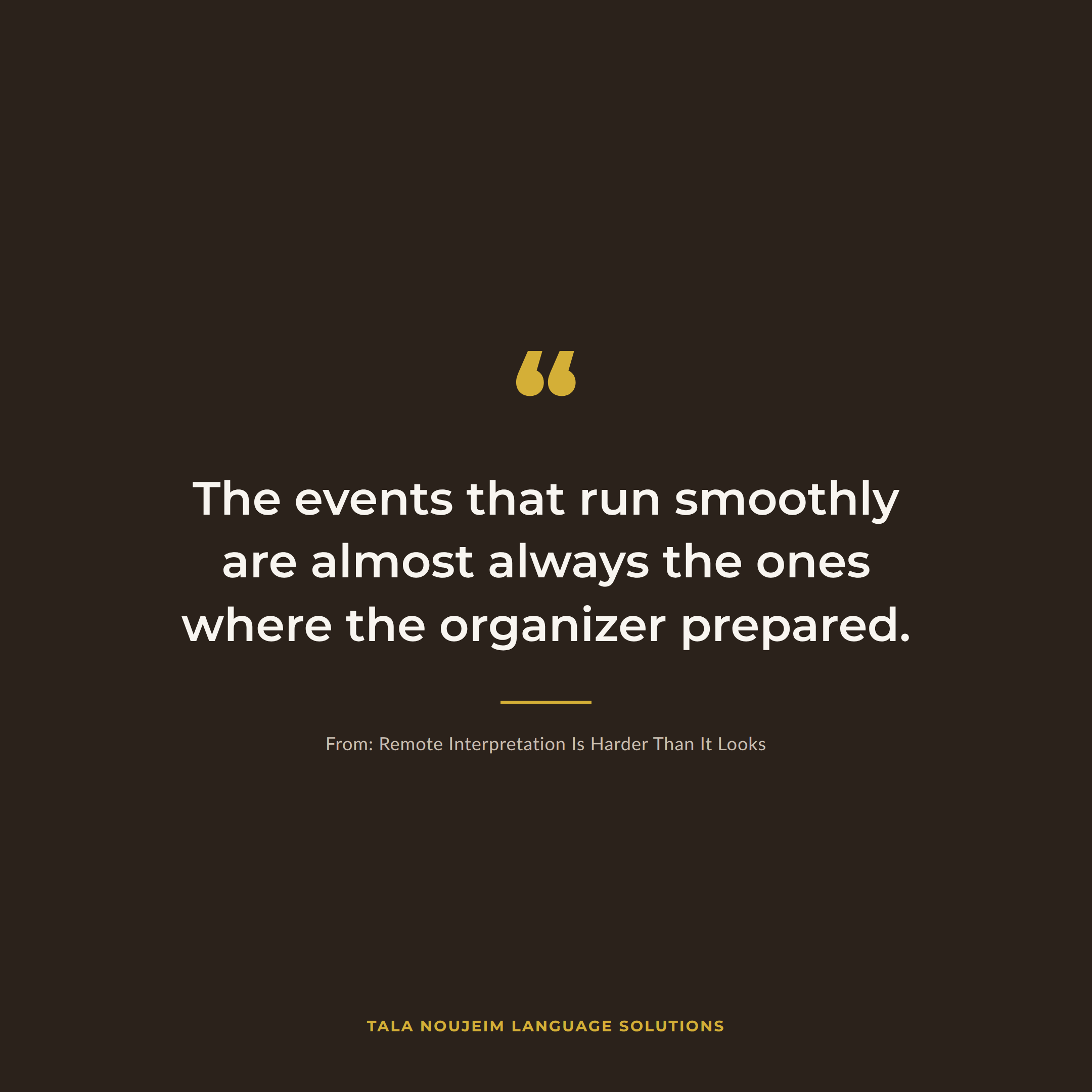
The events that run smoothly are almost always the ones where the organizer prepared. The ones that do not — where audio drops, where speakers rush, where platforms are not tested — are the ones where everyone assumed it would work itself out.
It rarely does.
At Tala Noujeim Language Solutions, we provide remote interpretation on Interactio, Ablio, Kudo, and Verspeak — and we brief every client on exactly what their team needs to do to make their event a success. Get in touch to discuss your next multilingual event.
References
AIIC — International Association of Conference Interpreters. (2020). Tips for Speakers: Virtual Multilingual Meetings with Simultaneous or Consecutive Interpretation.AIIC. (2020). Reference Guide to Remote Simultaneous Interpreting, Version 1.AIIC. (2020). Research on Remote Simultaneous Interpreting Platforms — Technical Tests on Sound Quality.Moser-Mercer, B. (2005). Remote Interpreting: Issues of Multi-Sensory Integration in a Technologically Rich Environment. Meta: Journal des Traducteurs.Frontiers in Psychology. (2022). A Synthetic Review of Cognitive Load in Distance Interpreting: Toward an Explanatory Model.Perspectives: Studies in Translation Theory and Practice. (2024). Charting the Landscape of Remote Medical Interpreting: An International Survey.The Interpretation Club. (2022). How Remote Simultaneous Interpreting Works.
